The Serverless Application Framework was the go to solution to deploy serverless application stacks, like AWS Lambda for quite a while. It offers a very easy to use YAML DSL to deploy common serverless patterns, like a Lambda function behind an API Gateway. However if serverless applications become more complex and consist of more than the default resources, you were back writing at CloudFormation again.
I faced a scenario like this recently. The same Lambdas needed to be deployed
behind two different API Gateways. One is hosted at the edge and the other one
was deployed regionally. Realizing this with the Serverless Framework isn’t
possible, because it only supports one API Gateway. The other one has to be
configured and referenced manually in the CloudFormation part of your
serverless.yml. This wasn’t the most comfortable way forward. Instead we
decided to go with CDK from here.
However it wasn’t possible to tear down the whole stack and rewrite the infrastructure in CDK, because we had resources holding important data (DynamoDB and Cognito Identity Pool). We didn’t want to have a downtime either, where we would dump the data back into the newly provisioned resources. So we needed to migrate over the existing stack and continue working on that via CDK. This wasn’t possible until of October 2020, when the CDK team announced the new cloudformation-include module.
In this post I want to go over a simple Serverless example and how we are able to migrate this project with the help of this new CDK module.
The Serverless example application
As a starting point we take the Rest API with DynamoDB example from the Serverless website. You can install it on your machine like this to go along:
serverless install -u https://github.com/serverless/examples/tree/master/aws-node-rest-api-with-dynamodb -n aws-node-rest-api-with-dynamodbWe slightly cut down the example to have a reason to do a migration. Namely we
remove the iamRoleStatements and environment variable from the
serverless.yml. This will be the part we want to add to the CDK Code as a
showcase how to add new infrastructure components to the existing stack. Now the
serverless.yml should look like this:
service: aws-node-rest-api-with-dynamodb

frameworkVersion: ">=1.1.0"

provider:
  name: aws
  runtime: nodejs10.x
functions:
  create:
    handler: todos/create.create
    events:
      - http:
          path: todos
          method: post
          cors: true

  list:
    handler: todos/list.list
    events:
      - http:
          path: todos
          method: get
          cors: true

  get:
    handler: todos/get.get
    events:
      - http:
          path: todos/{id}
          method: get
          cors: true

  update:
    handler: todos/update.update
    events:
      - http:
          path: todos/{id}
          method: put
          cors: true

  delete:
    handler: todos/delete.delete
    events:
      - http:
          path: todos/{id}
          method: delete
          cors: true

resources:
  Resources:
    TodosDynamoDbTable:
      Type: 'AWS::DynamoDB::Table'
      Properties:
        TableName: Todos
        BillingMode: PAY_PER_REQUEST
        AttributeDefinitions:
          -
            AttributeName: id
            AttributeType: S
        KeySchema:
          -
            AttributeName: id
            KeyType: HASH
Let’s install the dependencies and deploy the application with:
npm install && serverless deployWe get an API Gateway with five Lambda Proxies, which will be triggered when you do a request to the respective endpoint with the right method. Also a DynamoDB will be deployed, but the Lambdas don’t have access so far and don’t know the name of the DynamoDB, because we currently don’t pass it via an environment variable.
We can now try to create a todo. The output of serverless should have an output like this at the end:
Serverless: Stack update finished...
Service Information
service: aws-node-rest-api-with-dynamodb
stage: dev
region: eu-central-1
stack: aws-node-rest-api-with-dynamodb-dev
resources: 35
api keys:
  None
endpoints:
  POST - https://mhau9nhq75.execute-api.eu-central-1.amazonaws.com/dev/todos
  GET - https://mhau9nhq75.execute-api.eu-central-1.amazonaws.com/dev/todos
  GET - https://mhau9nhq75.execute-api.eu-central-1.amazonaws.com/dev/todos/{id}
  PUT - https://mhau9nhq75.execute-api.eu-central-1.amazonaws.com/dev/todos/{id}
  DELETE - https://mhau9nhq75.execute-api.eu-central-1.amazonaws.com/dev/todos/{id}
functions:
  create: aws-node-rest-api-with-dynamodb-dev-create
  list: aws-node-rest-api-with-dynamodb-dev-list
  get: aws-node-rest-api-with-dynamodb-dev-get
  update: aws-node-rest-api-with-dynamodb-dev-update
  delete: aws-node-rest-api-with-dynamodb-dev-delete
layers:
  None
Let’s try to create a todo by calling the todos endpoint via POST and giving a
todo:
$ curl -XPOST https://mhau9nhq75.execute-api.eu-central-1.amazonaws.com/dev/todos --data '{"text": "Migrate to CDK"}'
Couldn't create the todo item.
As expected we got an error, that we can’t create a todo item. If we go into the CloudWatch Logs for the create Lambda, we see an error message like this:
MissingRequiredParameter: Missing required key 'TableName' in params at ParamValidator.
Introducing CDK into an existing Serverless project
We are now at the point, where we want to add new stuff to our infrastructure, but don’t want to do it via CloudFormation. Instead we want to move the existing stack to CDK, but don’t want to recreate everything from scratch and also keep the DynamoDB with all its data as is (Yes, we waited around two years between chapter one and two).
To keep the new CDK code separated, we initiate the CDK project in a new subdirectory:
$ mkdir cdk-infra && cd cdk-infra && cdk init app --language=typescriptWe also move everything specific to the Lambda Code in another subdirectory.
$ cd .. && mkdir code;
mv todos package* node_modules/ code;
Let CDK use the existing CloudFormation stack
Now we want to import the existing stack into CDK. For this we use the new
cloudformation-include module. We can install it in the cdk-infra
subdirectory via npm:
npm install @aws-cdk/cloudformation-includeThe module has a CfnInclude class, which works the same like the one from the
aws-core module, but afterwards we can do a lot more, as you will see. Importing a
CloudFormation Template is similar to the old CfnInclude class, where we need
to pass a path to the CloudFormation Template, which represents the current
stack.
Since the serverless.yml is not an actual CloudFormation Template, we need to
retrieve the finished, rendered version from for example the AWS
UI. Navigating to the existing stack, which is called
aws-node-rest-api-with-dynamodb-dev, shows us a Template tab in which we
find the rendered CloudFormation template:
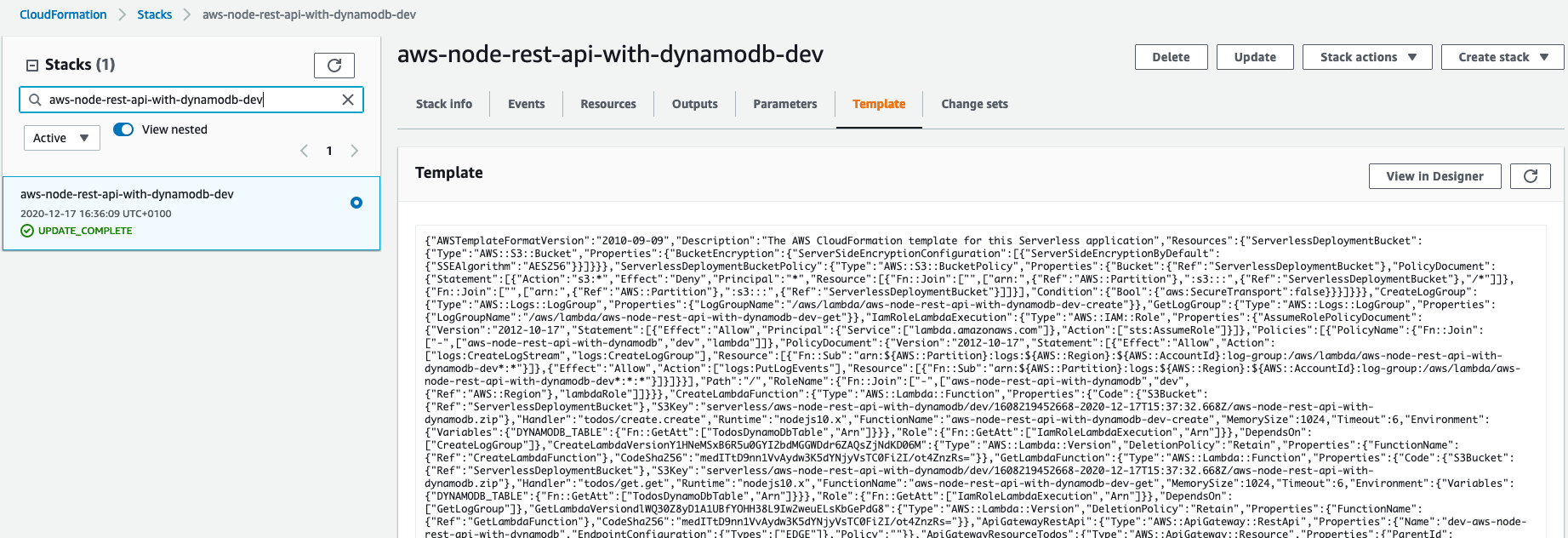
We copy/paste the template to the file cdk-infra/resources/template.json.
Under lib/cdk-infra-stack we edit the current code to create the CfnInclude
class and use the saved CloudFormation Template:
import * as cdk from '@aws-cdk/core';
import { CfnInclude } from '@aws-cdk/cloudformation-include';

export class CdkInfraStack extends cdk.Stack {
  constructor(scope: cdk.Construct, id: string, props?: cdk.StackProps) {
    super(scope, id, props);

    const cfnInclude = new CfnInclude(this, 'Template', {
      templateFile: 'resources/template.json',
    });
  }
}
The last thing we need to do is to name the stack, which CDK wants to create, to the
one which Serverless already deployed. For this we go to bin/cdk-infra.ts and edit
the stack name:
#!/usr/bin/env node
import 'source-map-support/register';
import * as cdk from '@aws-cdk/core';
import { CdkInfraStack } from '../lib/cdk-infra-stack';

const app = new cdk.App();
new CdkInfraStack(app, 'aws-node-rest-api-with-dynamodb-dev');
We are now able to execute all cdk commands from the cdk-infra
subdirectory. Let’s try if we can retrieve a diff between the deployed stack and
our code. When we try to get the difference between our CDK code and the
deployed stack via:
cdk diffwe get an error, which contains this message:
Error: Resolution error: Supplied properties not correct for "CfnRestApiProps"
  policy: "" should be an 'object'.
This is an inconsistency between CloudFormation and the CDK CloudFormation Reader. CDK always
expects an object for the policy key, but the rendered CloudFormation Template
has an empty string. To fix this we can remove it from the saved Template by
searching for the term ,"Policy":"" and remove it.
Now cdk diff should work and will give us the following output:
Stack aws-node-simple-http-endpoint-dev
Conditions
[+] Condition CDKMetadata/Condition CDKMetadataAvailable: {"Fn::Or":[{"Fn::Or":[{"Fn::Equals":[{"Ref":"AWS::Region"},"ap-east-1"]},{"Fn::Equals":[{"Ref":"AWS::Region"},"ap-northeast-1"]},{"Fn::Equals":[{"Ref":"AWS::Region"},"ap-northeast-2"]},{"Fn::Equals":[{"Ref":"AWS::Region"},"ap-south-1"]},{"Fn::Equals":[{"Ref":"AWS::Region"},"ap-southeast-1"]},{"Fn::Equals":[{"Ref":"AWS::Region"},"ap-southeast-2"]},{"Fn::Equals":[{"Ref":"AWS::Region"},"ca-central-1"]},{"Fn::Equals":[{"Ref":"AWS::Region"},"cn-north-1"]},{"Fn::Equals":[{"Ref":"AWS::Region"},"cn-northwest-1"]},{"Fn::Equals":[{"Ref":"AWS::Region"},"eu-central-1"]}]},{"Fn::Or":[{"Fn::Equals":[{"Ref":"AWS::Region"},"eu-north-1"]},{"Fn::Equals":[{"Ref":"AWS::Region"},"eu-west-1"]},{"Fn::Equals":[{"Ref":"AWS::Region"},"eu-west-2"]},{"Fn::Equals":[{"Ref":"AWS::Region"},"eu-west-3"]},{"Fn::Equals":[{"Ref":"AWS::Region"},"me-south-1"]},{"Fn::Equals":[{"Ref":"AWS::Region"},"sa-east-1"]},{"Fn::Equals":[{"Ref":"AWS::Region"},"us-east-1"]},{"Fn::Equals":[{"Ref":"AWS::Region"},"us-east-2"]},{"Fn::Equals":[{"Ref":"AWS::Region"},"us-west-1"]},{"Fn::Equals":[{"Ref":"AWS::Region"},"us-west-2"]}]}]}

Resources
[~] AWS::ApiGateway::RestApi Template/ApiGatewayRestApi ApiGatewayRestApi
 └─ [-] Policy
     └─
CDK always adds its Metadata to a stack and it wants to remove the empty
policy. Beside of these differences the CDK project would preserve anything in
the stack as it was before. We are now able to remove the serverless.yml and
continue building our infrastructure in CDK. But before we continue, let’s
deploy the changes:
cdk deployUse existing Resources in CDK
Now that we have imported the existing stack into our CDK project, we are able to use all resources, which are deployed as part of our stack. This is now possible thanks to the new cloudformation_include module.
To show you what I mean by this, let’s give our Lambda Functions the Environment
Variable with the DynamoDB name. First we need the DynamoDB and Lambda CDK packages. So
let’s install these inside of the cdk-infra directory as well.
npm install @aws-cdk/aws-dynamodb @aws-cdk/aws-lambda
Now we can assign the DynamoDB table name as an environment variable to the
lambda functions. Fist we retrieve the DynamoDB from CfnIncludes getResource method:
const dynamoDB = cfnInclude.getResource('TodosDynamoDbTable') as CfnTable;getResource takes the logical ID of a resource as the parameter. The
logical id can be found again in the AWS UI under the Resources tab for example.
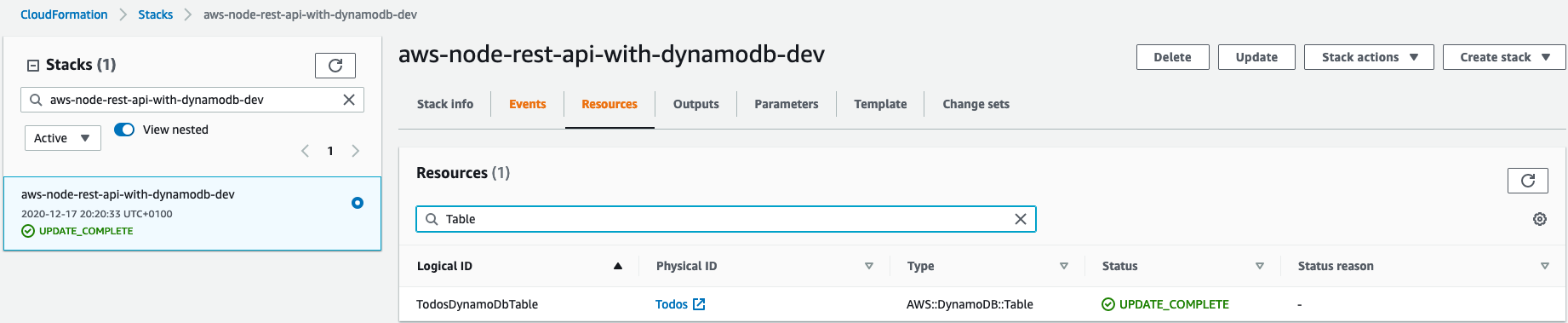
These resources will be imported as a generic type CfnResource and can be
casted to the respective Cfn sub type. In this case we cast it to
CfnTable.
Because you can emit the TableName it’s a conditional type and we extract the
table name next:
if (!dynamoDB.tableName) {
  throw new Error("DynamoDB has no name");
}
const dynamodbTable: string = dynamoDB.tableName;
If there would be no table name, we would throw an error. Now we can apply the
same principle to get the CfnFunctions. For this we again need the logical
ids. We save them in a readonly field of our class:
readonly lambdaLogicalNames = [
  'CreateLambdaFunction',
  'DeleteLambdaFunction',
  'GetLambdaFunction',
  'UpdateLambdaFunction',
  'ListLambdaFunction',
];
Now we can iterate over this array, get the CfnFunctions from these logical
ids and iterate over these to set the environment variable DYNAMODB_NAME:
const cfnFunctions = this.lambdaLogicalNames.map(
  (logicalName) => cfnInclude.getResource(logicalName) as CfnFunction
);

cfnFunctions.forEach((f) => f.environment = {
  variables: {
    'DYNAMODB_TABLE: dynamodbTable,
  }
});
Calling cdk diff again would give us the following changes:
Stack aws-node-rest-api-with-dynamodb-dev
Resources
[~] AWS::Lambda::Function Template/CreateLambdaFunction CreateLambdaFunction
 └─ [+] Environment
     └─ {"Variables":{"DYNAMODB_TABLE":"Todos"}}
[~] AWS::Lambda::Function Template/ListLambdaFunction ListLambdaFunction
 └─ [+] Environment
     └─ {"Variables":{"DYNAMODB_TABLE":"Todos"}}
[~] AWS::Lambda::Function Template/GetLambdaFunction GetLambdaFunction
 └─ [+] Environment
     └─ {"Variables":{"DYNAMODB_TABLE":"Todos"}}
[~] AWS::Lambda::Function Template/UpdateLambdaFunction UpdateLambdaFunction
 └─ [+] Environment
     └─ {"Variables":{"DYNAMODB_TABLE":"Todos"}}
[~] AWS::Lambda::Function Template/DeleteLambdaFunction DeleteLambdaFunction
 └─ [+] Environment
     └─ {"Variables":{"DYNAMODB_TABLE":"Todos"}}
Exactly what we want, let’s deploy it! Here is the complete code of the
lib/cdk-infra-stack.ts class as of now:
import * as cdk from '@aws-cdk/core';
import { CfnInclude } from '@aws-cdk/cloudformation-include';
import { CfnFunction } from '@aws-cdk/aws-lambda';
import { CfnTable } from '@aws-cdk/aws-dynamodb';

export class CdkInfraStack extends cdk.Stack {
  readonly lambdaLogicalNames = [
    'CreateLambdaFunction',
    'DeleteLambdaFunction',
    'GetLambdaFunction',
    'UpdateLambdaFunction',
    'ListLambdaFunction',
  ];
  constructor(scope: cdk.Construct, id: string, props?: cdk.StackProps) {
    super(scope, id, props);
    const cfnInclude = new CfnInclude(this, 'Template', {
      templateFile: 'resources/template.json',
    });

    const dynamoDB = cfnInclude.getResource('TodosDynamoDbTable') as CfnTable;
    if (!dynamoDB.tableName) {
      throw new Error("DynamoDB has no name");
    }
    const dynamodbTable: string = dynamoDB.tableName;

    const cfnFunctions = this.lambdaLogicalNames.map(
      (logicalName) => cfnInclude.getResource(logicalName) as CfnFunction
    );

    cfnFunctions.forEach((f) => f.environment = {
      variables: {
        'DYNAMODB_TABLE: dynamodbTable,
      }
    });
  }
}
If we try the curl command again, we still get the same error though. While CloudWatch yields a message like this:
aws-node-rest-api-with-dynamodb-dev-create is not authorized to perform: dynamodb:PutItem on resource
Right, we didn’t gave it the correct permissions. Let’s change this! The easiest
way to give a Lambda the necessary permissions is via the grant* methods. The
problem with these grant* methods is, they are only available on higher
constructs, but not for the Cfn variants. But this isn’t a big deal. We can
just retrieve the higher constructs via the static from* methods, they
provide. It looks like this for the DynamoDB table:
const table = Table.fromTableArn(this, 'HigherTable', dynamoDB.attrArn);For the Lambda Functions we can’t do the same. Because the grant* methods
modify the Lambda Execution Role, we need to provide it. If CDK is loading a
Function via fromFunctionArn it doesn’t load the role as well and therefore
can’t modify it. Instead we need to load the higher functions with the
fromFunctionAttributes method. There we pass the role as well as the ARN. Now
we can apply the same principles, we already discovered to get the role and pass
it to fromFunctionAttributes. First we install the iam module:
npm install @aws-cdk/aws-iam;And this is the according code:
const cfnRole = cfnInclude.getResource('IamRoleLambdaExecution') as CfnRole;
const role = Role.fromRoleArn(this, 'HigherRole', cfnRole.attrArn);
const functions = cfnFunctions.map((f) => Function.fromFunctionAttributes(
  this,
  'HigherFunction' + f.functionName,
  {
    functionArn: f.attrArn,
    role: role
  }
));
And finally we can grant read and write access to our functions:
functions.forEach((f) => table.grantReadWriteData(f));Executing the curl command again finally yields success:
{"id":"8b585470-40a7-11eb-9910-c977be42124e","text":"Migrate to CDK","checked":false,"createdAt":1608237390647,"updatedAt":1608237390647}
Apply Code Updates to Lambdas
You may already noticed that there is still an open issue, which we didn’t solve
so far. Serverless also packaged our Code into a zip file and pushed it to S3 to
update our Lambdas with the latest changes. If we would do a Code change now, it
wouldn’t deploy these changes. Let’s do an example. Currently an empty JSON
object is returned when we delete a todo item. Let’s return a meaningful
deletion message instead. We change the code for todos/delete.js like this:
...

// create a response
const response = {
  statusCode: 200,
  body: JSON.stringify('TODO Item successfully deleted!'),
};
cdk deploy only gives us this output
aws-node-rest-api-with-dynamodb-dev: deploying...

 ✅  aws-node-rest-api-with-dynamodb-dev (no changes)
Which already says that nothing changed. If we delete the item, we still get the empty json object back:
$ curl -XDELETE https://ztr40k0bf7.execute-api.eu-central-1.amazonaws.com/dev/todos/8b585470-40a7-11eb-9910-c977be42124e
{}
Thankfully CDK also provides a solution to this problem. But let’s have a look
at the deployment bucket of the Serverless Framework first. We see that
Serverless is zipping up the whole project directory and uploads the zip file into the S3
Bucket under the following path:
serverless/aws-node-rest-api-with-dynamodb/dev/<some-date-time-string>/.
There is a new CDK module called aws-s3-assets which has an experimental
Construct called Asset. With this construct we can achieve the same
goal. Basically we can give the path to our code directory and CDK is packaging
that directory into a S3 Bucket before the actual deployment. Afterwards we can
access information like the bucket name or object name. With these information
we can override the code attribute of our lambdas, so they get updated with
the newly uploaded code:
const asset = new Asset(this, 'LambdaCode', {
  path: '../code',
});

cfnFunctions.forEach((f) =>
  f.code = {
    s3Bucket: asset.s3BucketName,
    s3Key: asset.s3ObjectKey,
  }
);
If we create a new todo item and delete it afterwards, we get the new message and can be assured, that the newest version of our code was uploaded.
$ curl -XPOST
https://ztr40k0bf7.execute-api.eu-central-1.amazonaws.com/dev/todos --data '{"text": "Migrate to CDK"}'
{"id":"10150e20-40ac-11eb-9edf-0dd37a8498a2","text":"Migrate to   CDK","checked":false,"createdAt":1608239331330,"updatedAt":1608239331330}

$ curl -XDELETE https://ztr40k0bf7.execute-api.eu-central-1.amazonaws.com/dev/todos/10150e20-40ac-11eb-9edf-0dd37a8498a2
"TODO Item successfully deleted!"
Here is the final state of our lib/cdk-infra-stack.ts class:
import * as cdk from '@aws-cdk/core';
import { CfnInclude } from '@aws-cdk/cloudformation-include';
import { CfnFunction, Function } from '@aws-cdk/aws-lambda';
import { CfnTable, Table } from '@aws-cdk/aws-dynamodb';
import { CfnRole, Role } from '@aws-cdk/aws-iam';
import { Asset } from '@aws-cdk/aws-s3-assets';

export class CdkInfraStack extends cdk.Stack {
  readonly lambdaLogicalNames = [
    'CreateLambdaFunction',
    'DeleteLambdaFunction',
    'GetLambdaFunction',
    'UpdateLambdaFunction',
    'ListLambdaFunction',
  ];
  constructor(scope: cdk.Construct, id: string, props?: cdk.StackProps) {
    super(scope, id, props);
    const cfnInclude = new CfnInclude(this, 'Template', {
      templateFile: 'resources/template.json',
    });

    const dynamoDB = cfnInclude.getResource('TodosDynamoDbTable') as CfnTable;
    if (!dynamoDB.tableName) {
      throw new Error("DynamoDB has no name");
    }
    const dynamodbTable: string = dynamoDB.tableName;

    const cfnFunctions = this.lambdaLogicalNames.map(
      (logicalName) => cfnInclude.getResource(logicalName) as CfnFunction
    );

    cfnFunctions.forEach((f) => f.environment = {
      variables: {
        'DYNAMODB_TABLE': dynamodbTable,
      }
    });

    const table = Table.fromTableArn(this, 'HigherTable', dynamoDB.attrArn);

    const cfnRole = cfnInclude.getResource('IamRoleLambdaExecution') as CfnRole;
    const role = Role.fromRoleArn(this, 'HigherRole', cfnRole.attrArn);
    const functions = cfnFunctions.map((f) => Function.fromFunctionAttributes(
      this,
      'HigherFunction' + f.functionName,
      {
        functionArn: f.attrArn,
        role: role
      }
    ));

    functions.forEach((f) => table.grantReadWriteData(f));

    const asset = new Asset(this, 'LambdaCode', {
      path: '../code',
    });

    cfnFunctions.forEach((f) =>
      f.code = {
        s3Bucket: asset.s3BucketName,
        s3Key: asset.s3ObjectKey,
    });
  }
}
Summary
Thanks to the new cloudformation-include module we were able to migrate the
existing stack to CDK in no time. Afterwards it’s now possible to work with all
the resources deployed in the stack. You can use them as a reference for new
resources or extend/modify the existing ones. Lastly the updating of the
code is very tricky, but aws-s3-assets helps in this case.
If you want to go even further and rewrite parts of your infrastructure in CDK,
like the API Gateway for example, you can do so. For this you can remove the
respective part from resources/template.json and create the higher construct
in CDK directly:
import { RestApi } from '@aws-cdk/aws-apigateway';
...
const restApi = new RestApi(this, '<RestApiLogicalId>', {...});
const cfnRestApi = restApi.node.defaultChild as CfnRestApi;
cfnRestApi.overrideLogicalId('<pass the logical id of the existing rest api here>');
The important part is, that you pass the logical id of the existing resource
into the Cfn variant. If you now do cdk diff you see the differences between
the RestApi in CDK and what’s deployed. You can now incrementally resolve all
the differences until there are no left. Then you can deploy again and migrated
the resource successfully from CloudFormation into CDK code. However we don’t go
into detail here, because it doesn’t bring any functional benefits. However it’s
an option if you have the time and patience and really want to get rid of the
CloudFormation Template completely.