Lately we were setting up a VPC for a new, central EKS Cluster. This means, that it is operated by a platform team and developer teams will be able to operate their workloads in this cluster. Additional AWS resources, the team needs, are deployed within additional AWS accounts managed by the teams themselves and should be accessible from the central EKS Cluster VPC. Two of the more popular Services, developer teams use, are S3 and DynamoDB. Traffic should stay within AWS and not go through the public internet, because especially via S3 sometimes really big objects are downloaded and for these we don’t want to pay egress fees. This also gives you fewer security concerns and a lower latency due to fewer hops. The main question we wanted to answer for ourselves was: “Does a VPC Endpoint work with resources that live in another AWS account?” But during the execution of the experiment a second question arose: “Should we use a Gateway or Interface Endpoint for DynamoDB and S3”? To answer these questions, I stumbled upon a few interesting differences between both types of endpoints, which I want to talk about here.
The Experiment
The experiment was simple: Deploy a job into EKS to download a big file (around 2GB) from a Bucket which lives in another AWS account, after the VPC Endpoint was set up. Then check the PeakBytesPerSecond metric on the NAT Gateways of your VPC to see the spike in traffic. This is sufficient for most use cases. In our case the EKS Cluster was not in production yet and had traffic around 30KB/s on each NAT Gateway. But even if we were in production, we should be able to see the difference when a 2GB file is downloaded within 5 minutes.
The job also stays alive after the download finished. Then we can shell into the pod and verify some more things to which I come back later. Here is a simple diagram of how the setup looks like:
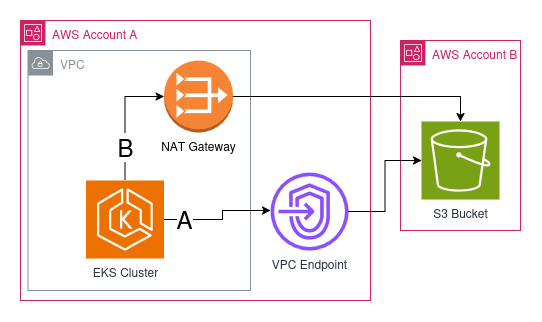
As you can see there are two possible routes how we could connect to the S3 Bucket:
A: through the VPC Endpoint
B: through the NAT Gateway over the internet
With the experiment we wanted to find out which one is used. With all that out of the way, let’s actually get to VPC Endpoints.
Gateway Endpoints predate Interface Endpoints
First I believed that interface endpoints actually exist for longer and gateway endpoints would be a newer thing, which is only supported for S3 and DynamoDB yet. Actually it’s the other way around. AWS started offering these two services as Gateway Endpoints and then introduced interface endpoints, because gateway endpoints bring a lot more complexity. The reason is that gateway endpoints operate on the route table with prefix lists. We will get to this point later on. Also gateway endpoints have fewer features than interface endpoints, like accessing the endpoint through a peered VPC or on-premises network. Gateway Endpoints also don’t support attaching security groups for more fine grained access control.
Gateway Endpoints are completely free
While using VPC Interface Endpoints is cheaper than sending data over a NAT Gateway, using Gateway Endpoints actually doesn’t cost you a single cent. For comparison a NAT Gateway in eu-central-1 costs you 0.052$ per hour for its existence and you pay 0.052$ for every GB you send through it. An interface endpoint on the other hand only costs 0.012$ per hour and 0.01$ per GB sent. It gets even cheaper if you can make it possible to send more than a petabyte of data through it. But the VPC Gateway Endpoint doesn’t charge you for either of these two categories.
When to choose which endpoint type?
Knowing this I asked myself: “What’s the catch with gateway endpoints or should I always use them?”. But I couldn’t find a catch. So if you don’t rely on the additional features of an interface endpoint and you need an endpoint for S3 or DynamoDB, you should always default to gateway endpoints, because of the cost savings.
Gateway Endpoints work with prefix lists
Coming back to the experiment from the beginning: I executed the container with the test application and observed the NAT Gateway metric afterwards. It was a success. I didn’t see an increase in the NAT Gateway metrics. But to be really sure I also wanted to verify that S3 is accessed through a private network. So I accessed the shell of the pod and did a nslookup:
~ # nslookup s3.eu-central-1.amazonaws.com
Server:         10.100.0.10
Address:        10.100.0.10:53

Non-authoritative answer:
Name:   s3.eu-central-1.amazonaws.com
Address: 52.219.170.189
Name:   s3.eu-central-1.amazonaws.com
Address: 3.5.139.238
Name:   s3.eu-central-1.amazonaws.com
Address: 52.219.140.83
Name:   s3.eu-central-1.amazonaws.com
Address: 52.219.46.135
Name:   s3.eu-central-1.amazonaws.com
Address: 52.219.170.157
Name:   s3.eu-central-1.amazonaws.com
Address: 52.219.72.159
Name:   s3.eu-central-1.amazonaws.com
Address: 52.219.170.125
Name:   s3.eu-central-1.amazonaws.com
Address: 52.219.169.245
I was completely confused. IP addresses in the 52 and 3 range are public. So was I still using a public route to S3 and the experiment was flawed? No, actually this is how gateway endpoints work: they use prefix lists instead of private IP addresses. That’s why you need to reference your subnets when creating an Interface Endpoint. Gateway Endpoints on the other hand reference routing tables. So I went on to check what my routing table looked like, that I gave to the Gateway Endpoint
$ aws ec2 describe-route-tables \
    --filters "Name=association.subnet-id,Values=subnet-<my-subnet-id>" \
    --query 'RouteTables[*].Routes' \
--output table| DestinationCidrBlock | DestinationPrefixListId | GatewayId | NatGatewayId | Origin | State |
|---|---|---|---|---|---|
| 192.168.128.0/18 | local | CreateRouteTable | active | ||
| 0.0.0.0/0 | nat-<my-nat-id> | CreateRoute | active | ||
| pl-6ea12345 | vpce-<my-endpoint-id> | CreateRoute | active |
In the last entry you can see that there is a DestinationPrefixListId connected to my S3 Gateway Endpoint. One can actually resolve this prefix list id via the AWS CLI like this
aws ec2 get-managed-prefix-list-entries \
   --prefix-list-id pl-6ea12345 \
--output table| Cidr |
|---|
| 16.12.24.0/21 |
| 16.12.32.0/22 |
| 16.15.20.0/22 |
| 3.5.134.0/23 |
| 3.5.136.0/22 |
| 52.219.140.0/24 |
| 52.219.168.0/22 |
| 52.219.208.0/22 |
| 52.219.218.0/24 |
| 52.219.44.0/22 |
| 52.219.72.0/22 |
With this command we get a list of CIDRs, which define IP address spaces. So a prefix list is a list of IP address spaces, where my service can reach S3 directly. And as you can see, the IP addresses I saw all fall into one of these CIDRs.
The experiment worked and just because resources are distributed between accounts, doesn’t mean VPC Endpoints don’t apply. They are still used and all traffic stays private. So a happy ending after all. I hope you could find something new about VPC Endpoints in this post. I myself was really surprised about the prefix list behavior and that public IP address ranges are used for Gateway Endpoints. But these public IPs are owned by AWS and the traffic from your VPC stays within the AWS internal network.