I’ve been a vivid evil citizen in the world of Emacs for many years now. One of the must-have settings in my opinion is, when using VIM keys for movement: Relative Line Numbers. It helps tremendously with navigating multiple lines up and down, because you always see the amount of rows you need to move.
This sounds a bit cryptic, so let’s visualize this with an example. Here is a code view with absolute line numbers:
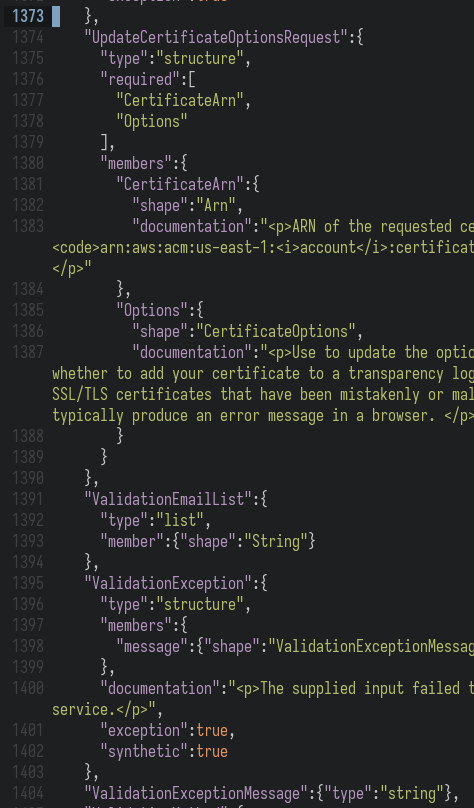
Let’s say we are on line 1373 and want to change a type in line 1396. We could just mash j a bunch of times (23 to be exact) or we could input 23j once and be there right away. But with absolute line numbers it’s not always easy to find out the number of lines you need to move, without doing some math in your head.
This is where relative line numbers come into play:
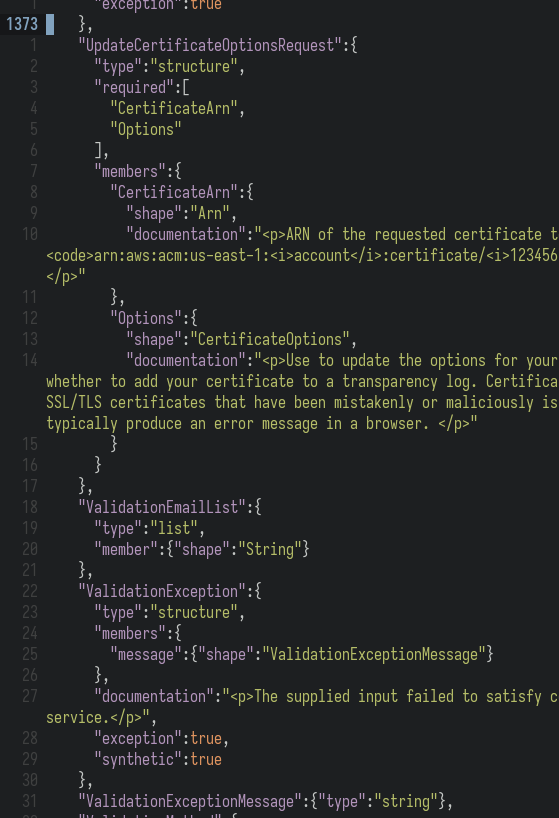
Again we want to move 23 lines down. Do you see the difference? You only need to read the number where you want to go and input it before j (down) or k (up). No need to subtract two numbers from each other in your head anymore. When skimming through code you do this kind of movement several times in a matter of minutes. Every time you just need to look at the number instead of doing mental arithmetic. This adds up and will save you a lot of time over the day.
Now that we know that this feature is useful, how do we get it in Emacs? Back in Emacs 23.1 linum-mode was introduced, which brought the possibility to have line numbers in a column to the left of the text. Before this Emacs showed you the line number you were in, in the mode-line at the bottom. But many modern editors made the number column left to the text a mainstream feature and so Emacs wanted to offer it as a feature as well.
To get relative line numbers with linum-mode you had to install a third party package called linum-relative, because the package itself never included it.
Fast forward almost exactly 14 years (Emacs 23.1 released on 2009-07-29) and linum-mode became obsolete with 29.1 (Release Date: 2023-07-30). The reason was that it was implemented in a hacky way and it made Emacs really slow when large files were open. Where do we go from here?
Introducing display-line-numbers-mode: This was a new built-in package shipped with Emacs 26 (Release Date: 2018-05-28) which should offer the same functionality as linum-mode without slowing down on large files. Basically linum-mode but fast. With Emacs 29, display-line-numbers-mode is not only an alternative to linum-mode, but its official successor.
And the best thing: it supports relative line numbers out of the box. That’s what got me excited. Solving an issue with built-in features instead of having to install more packages. Here is what we need to do:
(setq-default
    display-line-numbers-type 'relative)
(global-display-line-numbers-mode)
and at the same time we can get rid of this:
(global-linum-mode t)
(use-package linum-relative
  :custom
  (linum-relative-backend 'display-line-numbers-mode)
  :config
  (linum-relative-global-mode))
This gives you the same exact functionality in Emacs 29 and above with the new built-in display-line-numbers-mode package as linum-mode + linum-relative gave you. Another great feature display-line-numbers-mode offers is to set display-line-numbers-type 'visual instead of 'relative. This gives you relative line numbers based on visual lines instead of buffer lines. This means if a line is so long that it continues on the next line of your buffer (which is your view where the file content is shown), 'visual counts this as two lines instead of one, which 'relative would do. This makes navigation even more precise, especially if you work on code or text with long lines a lot. That’s why I will probably also move to 'visual.
I hope this quick tip is of help to you. I was first thinking of introducing a new category bits with smaller bite-sized experiences than the normal blog post size of my past postings. But looking at the text now and seeing what I ended up with, I will continue to have these also under the normal posts.